
My Claude Code Workflow
My Claude Code Workflow
Background
I started, like a lot of people, with ChatGPT. I was building some proof-of-concept web services, running them locally, and copy-pasting code back and forth between my browser and local files. It worked until it didn't. As the codebase grew, ChatGPT increasingly struggled to hold the big picture in its head. Large files were painful, context filled up constantly, and the model would forget how the changes it was making fit into the overall picture.
The result was subtle inconsistencies: locally correct changes that didn't quite line up globally.
I knew I needed two things: an LLM that could see the whole project, and a workflow that didn't involve endless copy-paste.
I'm not an IDE fan, but I'd seen Claude Code mentioned as a command-line tool. That alone was enough to make me try it.
The "Oh Wow" Moment
My first reaction was very simple: yay, no more copy-paste.
But the real shock was speed.
ChatGPT (especially with larger code files) often felt slow, sometimes timing out mid-generation. Claude Code, by contrast, just changed things. Immediately. Right on my machine.
You install it, run claude inside your project directory, and suddenly the model has read/write access to the entire codebase. Every command it wants to run requires permission: allow once, allow always, or suggest something else. And it shows you exactly what it changed.
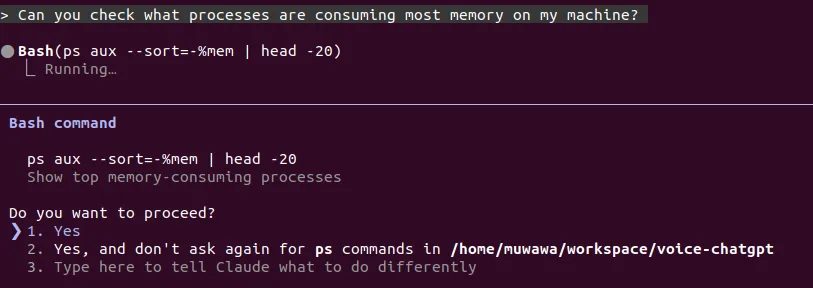 Claude Code asking for permission before running a command
It felt blazing fast. Compared to my previous workflow, progress was almost absurd.
At this point it's worth clarifying a distinction that isn't obvious to everyone but that matters a lot: Claude, ChatGPT and Copilot (the apps/web interfaces most people use) help you think about code and can suggest changes to code you provide them. Claude Code actually works on your code.
The Autopilot Phase
Early on, I was basically on autopilot.
I described features in plain English, said "yes" to almost every permission prompt, and let it make big, sweeping changes. Refactors, new features, plumbing, all moving quickly. I trusted it. And for a while, that trust was rewarded.
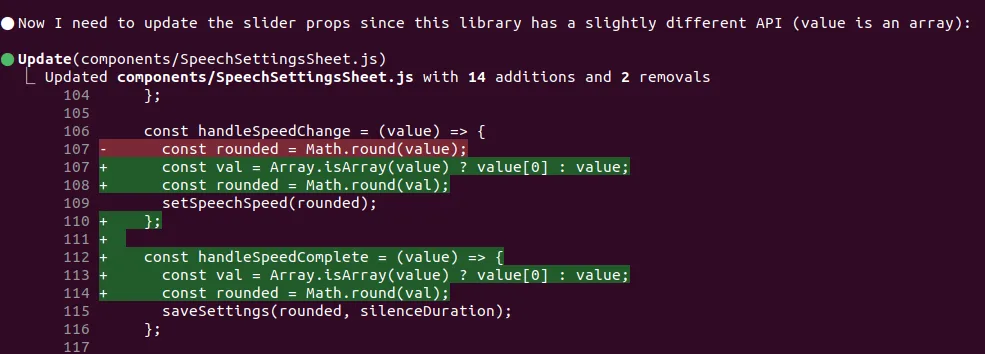 Claude Code making changes to the codebase
I also quickly set it up across all my projects and started asking it to handle git commands (commits and rollbacks). At some point it even started committing unprompted, which I was completely fine with.
First Big Slip Up
Claude would occasionally touch files I didn't expect, small UI changes elsewhere in the app that were technically fine but unrelated to what we were working on. Nothing catastrophic, but enough to raise an eyebrow.
Then came the moment that snapped me out of autopilot.
I had implemented referral logic where the referrer gets a bonus. Claude "fixed" it so that both the referrer and the referred user got a bonus.
Perfectly reasonable product logic. Also a direct, real cost to me. Claude was trying to be helpful, but it wasn't aligned with my business constraints.
Evolving the Workflow: Adding Just Enough Friction
I didn't swing to the other extreme and lock everything down. Instead, I added selective friction.
I reduced task size. I started at least scanning file names for every change. I became more deliberate about scope. Crucially, I leaned hard into planning mode.
Claude has a planning mode that blocks all code changes until the scope is fully discussed. I always start with this prompt (credit to Harper Reed):
"Ask me one question at a time so we can develop a thorough, step-by-step spec for this idea. Each question should build on my previous answers, and our end goal is to have a detailed specification I can hand off to a developer. Let's do this iteratively and dig into every relevant detail. Remember, only one question at a time."
Claude then usually asks between 5 and 30 questions about the scope. It forces me to think clearly about requirements and edge cases, and it forces Claude to consider unintended side effects before touching anything. Rework drops dramatically.
From Planning to Execution
Once planning is done, I have Claude generate three artefacts:
-
Scope / specification document: Requirements, edge cases, architecture, data handling, error cases, testing plan. Example here. I use this prompt to generate the specification:
"Now that we've wrapped up the brainstorming process, can you compile our findings into a comprehensive, developer-ready specification? Include all relevant requirements, architecture choices, data handling details, error handling strategies, and a testing plan so a developer can immediately begin implementation."
-
Prompt plan: A sequence of prompts, in Claude's own words, breaking the work into digestible chunks. Example here. I use this prompt to generate the plan:
"Using the spec you just generated, draft a detailed, step-by-step blueprint for building this project. Then, once you have a solid plan, break it down into small, iterative chunks that build on each other. Look at these chunks and then go another round to break it into small steps. Review the results and make sure that the steps are small enough to be implemented safely, but big enough to move the project forward. Iterate until you feel that the steps are right sized for this project.
From here you should have the foundation to provide a series of prompts for a code-generation LLM that will implement each step. Prioritize best practices, and incremental progress, ensuring no big jumps in complexity at any stage. Make sure that each prompt builds on the previous prompts, and ends with wiring things together. There should be no hanging or orphaned code that isn't integrated into a previous step.
Make sure and separate each prompt section. Use markdown. Each prompt should be tagged as text using code tags. The goal is to output prompts, but context, etc is important as well."
-
Todo / action tracker: A checklist mapped to the prompt plan. This is for me and for Claude, context loss is real on large features, and this helps both of us stay oriented. Example here.
"Please make a
todo.mdbased on the prompt plan that I can use as a checklist. Be thorough. Then please execute the prompt plan, updating the checklist with your progress."
From there, execution depends on risk: low-risk changes might run mostly unattended, higher-risk ones get manual approval.
It's lightweight, but surprisingly robust.
Git Commits Change Everything
When you're coding yourself, rolling back a commit often means undoing bugs but also losing good work. Redoing that work can be costly so you usually try to patch forward instead.
But Claude doesn't care.
If something gets messy, I roll back and try again. Claude will usually re-implement the solution differently, explicitly avoiding whatever caused the rollback. It rarely writes the same code twice.
The Result
I spend less time typing code and more time deciding what should exist, what shouldn't, and what trade-offs I'm willing to make. Claude does the mechanical work, and does it tirelessly.
Projects built using this workflow: Babblo (language learning app), my blog CMS, and most recently an AI-powered job tracker.